Return to previous page Return to menu Go to next page

Mosaic function
MPEG playback image is divided into horizontal size, vertical direction and specified size, and the color of the upper left dot of each area is displayed with all the dots in that area. Up to full screen size can be specified independently in horizontal and vertical directions.

● Fade function
This is a function to display the screen brightness and color difference signals with magnification, and is used for fade-in, fade-out, etc. Since it is not a method to adjust the offset value, only the brightness can be changed correctly. Also, by changing the color difference signal, it is possible to make the monochrome display or the display color darker.

Chroma key function
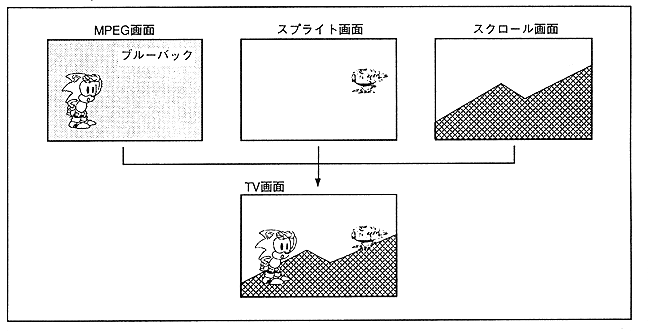
As shown in Figure 3.33, this is a function to play a movie with transparent dots. Chroma key is a technique of “photographing a person or the like in front of a blue wall, extracting a non-blue part from the screen and overlaying it on another picture”. In existing MPEG LSI, MPEG moving images can only be used in the background, but Saturn can display MPEG moving images on top of sprites and scrolls using the chroma key function.

Figure 3.33 Chroma key function

Return to previous page Return to menu Go to next page