Return to previous page Return to menu Go to next page

Port status

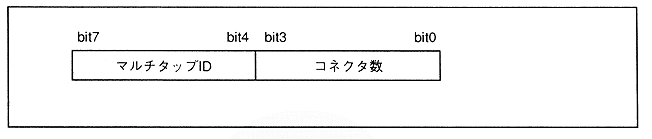
The port status is 1-byte data indicating the status of the peripheral connected to the port. By using the port status, it is possible to determine whether a peripheral is directly connected to the port or how many multi-tap are connected. Figure 3.14 shows the port status configuration.

Figure 3.14 Port status configuration

Number of connectors
The number of connectors indicates 1H if a peripheral is directly connected to a peripheral port, and indicates that one peripheral is connected to that port. If a multi-tap is connected, it indicates the number of taps for that multi-tap. 0H is displayed when nothing is connected to the peripheral port or when a peripheral that cannot be recognized by SMPC is connected to the peripheral port.
Table 3.5 shows the relationship between the number of connectors and the connected peripherals.

Table 3.5 Relationship between number of connectors and peripherals
 Number of connectors 
 Connected peripherals 
 0H 
 ・ Not connected 
・ SMPC UNKOWN peripheral is connected
 1H 
 ・ Peripherals are connected directly 
 2H to FH 
 ・ Number of multi-tap taps 


Return to previous page Return to menu Go to next page