Return to previous page Return to menu Go to next page

■ User clipping enabled

User clipping enable bit: user clipping enable bit (Clip), bit 10
Specifies whether or not to draw the part according to the user clipping coordinates that have already been set for the part drawing command. When 0, the user clipping coordinate is ignored and the clip is drawn and drawn according to the system clipping coordinate. When 1, it is clipped and drawn according to the specification of the user clipping coordinate and clipping mode bit (Cmod). When it is 1, it is clipped with system clipping coordinates.
Since both the user / system clipping coordinates are undefined at reset, specify the user clipping coordinates with the clipping register setting command before resetting the user clipping coordinates after resetting the system clipping coordinates.

■ User clipping mode

Clipping mode bit: Clipping mode bit (Cmod), bit 9
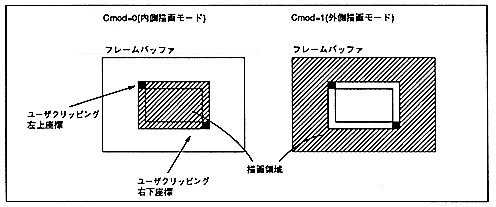
When user clipping is enabled (Clip = 1), select whether to draw the inside or outside of the user clipping coordinates. When 0, the inside is drawn, and when 1, the outside is drawn.
When Cmod = 1, it will be the drawing area including the user clipping short line already specified. When Cmod = 0, the drawing area does not include the short line.

Figure 6.7 Drawing area
∙ Do not set this bit to 1 when user clipping is disabled (Clip = 0).
The combination of user clipping valid bit and clipping mode bit is as follows.

 Clip 
 Cmod 
 User Clipping processing 
 0 
 0 
 User clipping disabled 
 0 
 1 
 Setting prohibited (Do not set) ) 
 1 
 0 
 Inner drawing mode 
 1 
 1 
 Outside drawing mode 


Return to previous page Return to menu Go to next page