7.5 Rectangular Sprite Drawing Command
When the end bit is 0B and the command selection bit is 0001B, this is a rectangular sprite drawing command. When the zoom point is 0000B, it is defined by specifying two coordinates. When it is other than 0000B, the fixed point specification is defined.
* Rectangular sprites cannot be rotated 90 °. If you want to rotate 90 degrees, use the sprite drawing command.
■ Specify two coordinates (rectangular sprite drawing command)
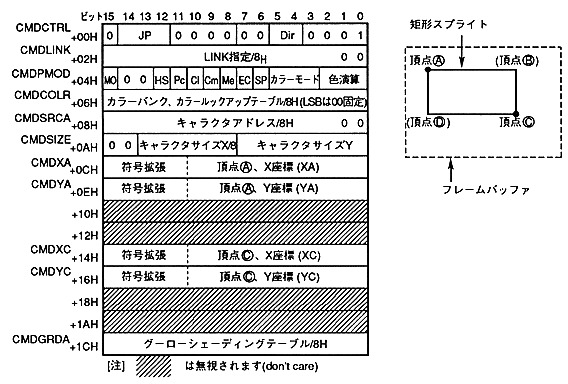
The two-point coordinate specification for the rectangle sprite drawing command is defined as follows.
- If the end bit is set to 0B and the command selection bit is set to 0001B, it becomes a rectangular sprite drawing command.
- Specify the jump format. When the jump format is assign or call, divide the address of the command table to be processed next by 8H and set to CMDLINK.
- Set the zoom point to 0000B. Specify two coordinates.