Chapter 8 Window
8.1 Window area
∙ For the normal window, you can select either the normal rectangular window specified by the horizontal and vertical start and end coordinates, or the normal line window that specifies the horizontal start and end coordinates for each line. The start point and end point coordinates are not coordinate values on the scroll screen, but coordinate values on the TV screen are set in each register.
■ Normal rectangular window
∙ If the start point coordinate is larger than the end point coordinate in either the horizontal direction or the vertical direction, the entire screen will be judged as the area outside the window.
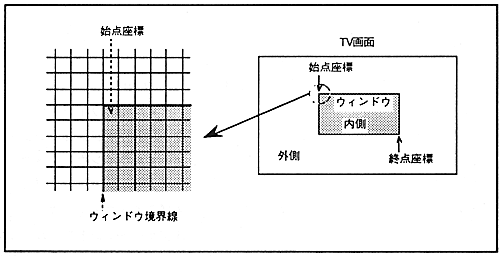
The normal rectangular window is shown in Figure 8.1.
Figure 8.1 Normal rectangular window