Return to previous page Return to menu Go to next page

Chapter 11 Priority function

VDP2 compares the priority number values ​​of the sprite and each scroll screen, and determines the display priority from the top to the third. At that time, the priority number of the sprite can be selected for each character from a maximum of 8 values, and the priority number of each scroll screen can be changed for each character or dot by using the special priority function. I can do it.
∙ When the priority of the specified screen is the highest, the line color screen can be inserted in the second position, one below the screen.

11.1 priority function

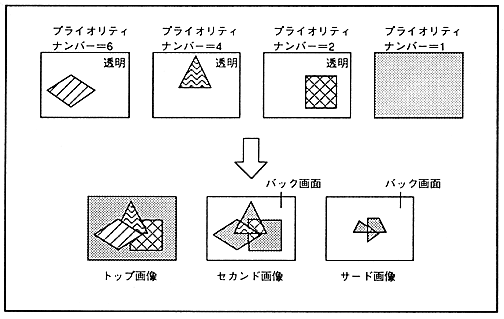
The priority (display priority) of the sprite and each scroll screen is determined by comparing the size of the priority number of the screen where the dots located at the same TV screen coordinates are not transparent for each dot. The higher the priority number, the higher the priority of the screen. An image composed of dots with the highest priority is called the top image 061 third image. In addition, the back screen is displayed at the position where the dots of all sprites and each scroll screen are transparent. The priority function is shown in Figure 11.1.

Figure 11.1 Priority function
■ Priority number

The scroll screen has one 3-bit priority number register per screen. This priority number is usually used for the entire surface, but the value of the least significant bit can be changed for each character or dot in the special priority mode. Sprite priority number


Return to previous page Return to menu Go to next page