Return to previous page Return to menu Go to next page

Chapter 14 Shadow Function

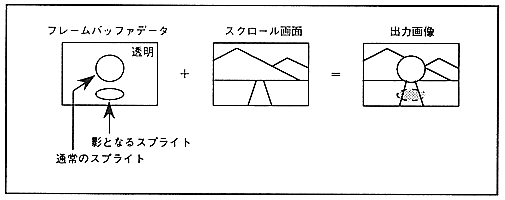
Shadow function is a function to add a shadow to the sprite itself or the scroll screen using the sprite. There are two types of shadow sprites, normal shadows and MSB shadows, depending on the data. MSB shadow can be used only when the sprite type is type 2-7. The shadow function is used only when the priority of the shadow sprite has the highest priority.
The shadow function is processed after the color calculation function and color offset function. The shadow function is shown in Figure 14.1.

Figure 14.1 Shadow function
■ 14.1 Shadow processing

In the shadow processing, when the priority of the sprite of normal shadow or MSB shadow is the highest, the sprite is forced to be transparent, and there was a sprite in the top image determined on the screen excluding the sprite The brightness of the part is halved.

■ Normal shadow

For normal shadow sprites, only the least significant bit of the dot color data in the specified sprite type is 0, and all other dot color data is 1, so the number of bits determined by the sprite type changes. The
For normal shadow sprite data, specify a color control word in which all bits of the dot color data except for the dot color code are 1, the least significant bit is 0, and the remaining bits are all 1. It is created by writing a dot color code sprite character to the frame buffer. At this time, since the frame buffer data that has already been written is overwritten, the sprite cannot be shaded. Therefore, normally write to the frame buffer first. For details on the color control word, see " VDP1 User's Manual ".
Scroll screens and back screens that are shaded by normal shadow sprites can be specified for each screen.


Return to previous page Return to menu Go to next page