MSB shadow
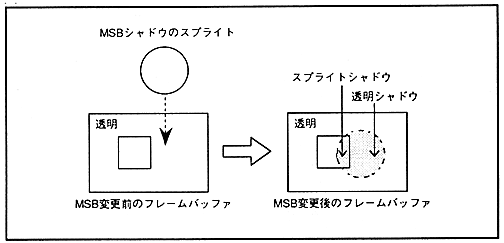
∙ MSB shadow sprite data is created by changing only the MSB to 1 to the MSB shadow sprite shape for the frame buffer data in which VDP1 has already been written. (Refer to “ MSB ON ” in “ VDP1 User's Manual .”) At this time, all bits of the frame buffer data before changing the MSB are 0. If not, that is, if a normal sprite has already been written, it becomes a sprite shadow and casts a shadow on that sprite character.
If all the bits of the frame buffer data before changing the MSB are 0, that is, if it is transparent, it becomes a transparent shadow, and for the scroll screen whose priority is one lower than the sprite of that transparent shadow To add a shadow. A scroll screen and a back screen that are shaded by a transparent shadow sprite can be specified for each screen.
∙ When using a sprite window, this MSB shadow cannot be used. Please refer to 8.1 Window Area for the sprite window.
∙ Sprite shadow and transparent shadow are shown in Fig. 14.4, and MSB shadow sprite data is shown in Fig. 14.5.
Figure 14.4 Sprite shadow and transparent shadow