6. Other functions
6.1 Development support function
仕 組 み The mechanism for making debug files accessible in the same way as files on a CD-ROM is directory information reading processing.
When reading directory information from CD-ROM, directory information is also read from the debug file. The debug file information is processed by replacing or adding to the CD-ROM file information.
After reading directory information from a directory on the CD-ROM, the following processing is performed.
(1) Replace
(2) Add
∙ Memory files have higher priority than DOS files when replacing debug files.
The following is an example of how these processes are performed. Figure 6.1 shows the file structure.
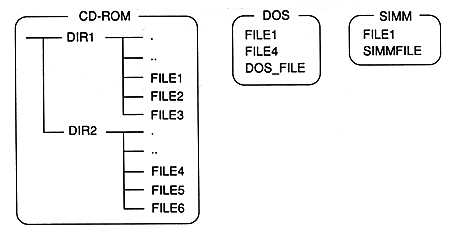
Figure 6.1 File configuration example