4.2 Import MPEG system status
Therefore, call the MPG_CaptStat function for each VSYNC at one of the following timings to capture the MPEG system status.
(A) Clear MPMP flag with VBLANK-IN interrupt, and wait for it to turn on
(B) Call with VBLANK-OUT interrupt
Caution While executing the following functions, it is prohibited to execute the MPG_CaptStat function in interrupt processing.
Example of processing
《Still image playback》
4.3 VDP2 output mode
Since it is difficult for the application software to obtain the VSYNC timing on this game machine, it is recommended to perform MPEG-related processing from the VBLANK-OUT timing.
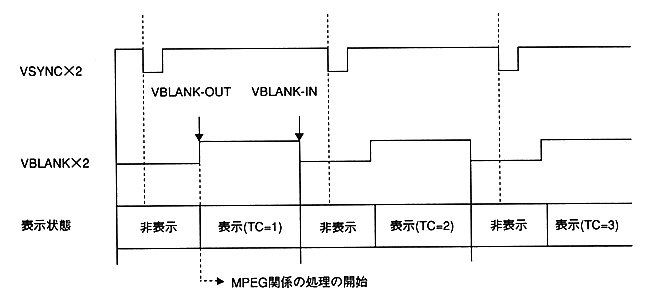
Figure 4.2: Timing of processing during VDP2 output
(1) Wait for VBLANK-OUT.
(2) Call the MPG_CaptStat function.
(3) Get the time code.
(4) Get collision data corresponding to the time code.
(5) Perform hit judgment, etc., and make MPEG settings corresponding to the result.
(6) The setting of (5) becomes effective at the next frame. 4.4 Host transfer mode