Return to previous page | Return to menu | Go to next page
Tool Guide
■ Debug support function overview
● Debug support function overview
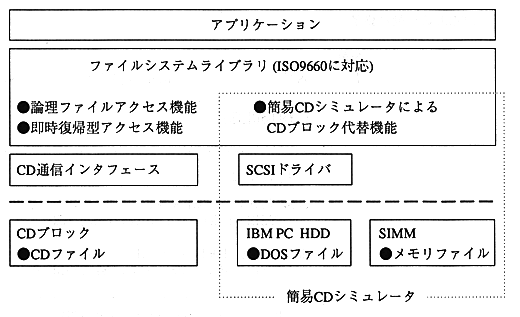
The file to be read from the CD is read from the memory file in the RAM on the target or the DOS file in the SCSI hard disk, and the CD-ROM is simulated to support efficient debugging. .
If the same file name exists, SIMM, SCSI, and CD have the highest priority in that order, so I want to test the operation by patching the program and data from the CD for the debugged file and from SCSI for the debugged file. In some cases, loading files from SIMM will enable efficient debugging.
● CD library debugging support function
CD file
A file recorded on a CD in ISO9660 format.
It can be read from a CD disk or CD emulator through a CD block.
DOS file
Files recorded on the HDD in MS-DOS format.
Using a SCSI driver, data can be read from the IBM PC simple simulator software.
Memory file
A file recorded on memory in memory file format.
It can be read directly using the file system library.
Return to previous page | Return to menu | Go to next page