Before starting the virtual CD emulator, read the VCD I / F board and connect the cable. The terms used in the VCD I / F board are also used in this manual, but are not explained here as they are already understood.
The following settings on the VCD I / F board are required to operate the virtual CD emulator.
- Jumper number for selecting interrupt number (J3)
- Jumper number for selecting the channel number for DMA transfer (J4)
- Jumper number for selecting the I / O address of the VCD I / F board (J5)
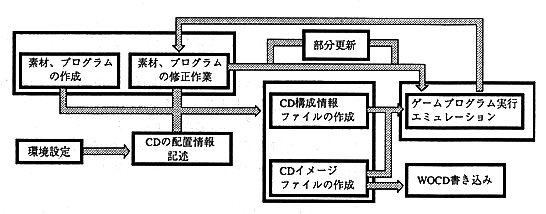
Figure 2. Rough flow of work
A rough flow of the work is shown in Figure 2, and the figure is explained below. In the next chapter, we will work with more specific examples.