
[Opening screen]
Press
- A button to move to the first test item.
- Displays a directory in ISO9660 format. Only the first 8 entries in the root directory (substantially 6 entries, including self and parent) are displayed. Also displays directory attributes.
An OK message is displayed when the specified file name and size are used.
When the check is completed, COMPLETE is displayed on the bottom line. An error message is displayed if it is different or not readable.
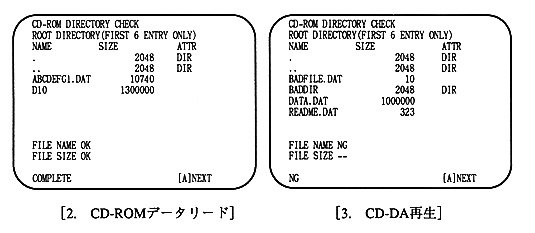
[2.CD-ROM data read]
- ABCDEFG1.DAT and D10 are known, so check them by reading and comparing the data. When finished, COMPLETE is displayed on the bottom line and it waits for A button input.