■ Reassign module ID
- Double-click the ID of the module to be reassigned.
- Enter the value to be changed and click “OK”.
-
Parameter editing
-
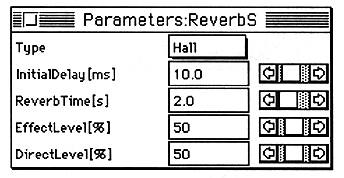
- Double-click the module selection field.
- Change the value by moving the scroll bar with the mouse or clicking in the value display frame and entering the value directly.
The parameter edit window is displayed.
The “Renumber” dialog box appears.
The module ID is changed.
If the changed IDs are duplicated or discontinuous, the IDs of other modules are automatically adjusted so that the IDs are continuous.