■ Specify input buffer for modulator
● SoundSlotEG / LFO drive module: 0 ~ 15
● SoundSlotEG / LFO drive module: 0 to 31
- Click “M” in the module.
- Specify the buffer number and click “OK”.
-
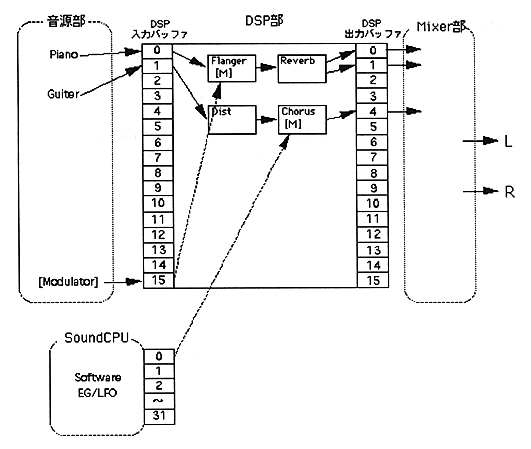
● About the modulator input buffer
The - modulator input buffer is a buffer for importing the waveform created by the SCSP sound generator (SoundSlotEG / LFO) or sound CPU (SoftwareEG / LFO) into the DSP as LFO or EG. In hardware, a part of DSP input buffer for music (SoundSlotEG / LFO) or a part of DSP DRAM area (SoftwareEG / LFO) is reserved for this purpose. See the diagram below for details.
The input buffer setting dialog for the modulator is displayed.
The buffer number is set.