Parameter edit window
There are two types of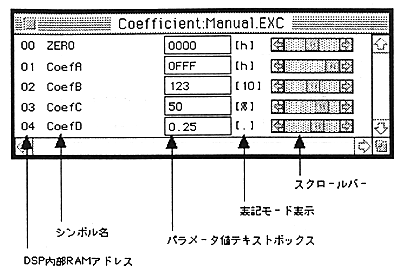
DSP internal RAM address
This is the address in the internal RAM on the DSP hardware where the data corresponding to each coefficient name (COEF) / address constant (ADRS) symbol name is stored.
Symbol name
The name used in the coefficient / address constant definition part of the SCSP / DSP assembler “dAsms” source code is displayed.
Parameter value text box
This is the part that displays / inputs the parameter value. In the SCSP / DSP assembler “dAsms” source code, it is possible to display / input according to the notation mode specified for each data in the coefficient / address constant definition part. Refer to the DSP Assembler User's Manual for the notation mode, the variable range of data in each notation mode, the data conversion method, and the formats that can be entered.
Notation mode display
The notation mode specified for each data in the coefficient / address constant definition part is displayed on the SCSP / DSP assembler “dAsms” source code.
Scroll bar
Data can be changed by operating with the mouse.