Return to previous page | Return to menu | Go to next page
Window settings in SGL
To actually set a window in SGL, use the library function “slWindow”. In addition, SGL has already set a default window that can be reconfigured in the same size as the projection plane in the initial state (when slWindow is not used).
- [void slWindow (left, top, right, bottom, Zlimit, CENTER_X, CENTER_Y);]
The
- library function slWindow sets the window area on the projection plane. Each parameter sets the screen coordinates for determining the upper left and lower right screen coordinates, the rear limit coordinates, and the line-of-sight direction of the window on the projection plane. The figure below illustrates each parameter.
Figure 4-14 Meaning of parameters in “slWindow”
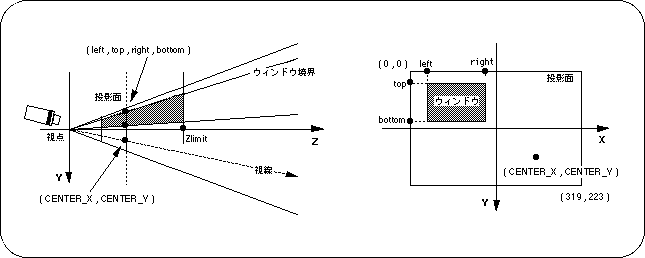
Note) Left, top, right, bottom, CENTER_X, CENTER_Y indicate XY coordinate values for the monitor.
The parameters of the library function “slWindow” are defined as follows:
- [Sint16 left, top, right, bottom]
- Indicates the screen coordinate values of the upper left and lower right for the projection plane (monitor) of the window.
The range of values depends on the screen mode (the maximum value is the full resolution of the screen mode).
In the default window, the window size and the monitor size are set the same (maximum value).
- [Zlimit]
- Specify the projection limit value of the window.
The projection limit value is a parameter for determining how much space from the front limit plane specified by the function “slZdspLevel” is actually projected onto the projection plane (specifying the rear limit plane) .
If “Zlimit = -1” is assigned, the Zlimit value of the window set immediately before is used.
If no window has been previously set, the default window value (7FFF) is used.
- [CENTER_X, CENTER_Y]
- Determines the line-of-sight direction, and the parameters are expressed as screen coordinate values. By changing this value, you can determine where distant objects converge on the screen.
This point is generally called the “vanishing point” in the 3D graphics world.
In the default window, the “vanishing point” is set at the center of the screen.
Screen coordinates are a 2D coordinate system corresponding to the TV monitor that is the projection plane.
The upper left is the origin, the X axis is the right direction, and the Y axis is the lower direction. The range of values varies depending on the screen mode, but is usually expressed in (horizontal: 320 x vertical: 224).
Figure 4-15 Image difference between CENTER_X and CENTER_Y
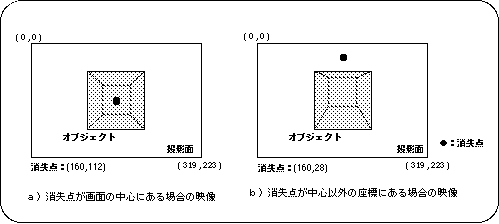
Note) Conditions for objects, viewpoints, etc. are the same for both a) and b)
Return to previous page | Return to menu | Go to next page